Onboarding paperwork arrives as scans: an ID, a tax record, three statutory forms and a contract. Someone reads all six, retypes about fifteen fields, and reconciles the values that appear on more than one document. We automated that for an HR team, and the hard part was never the reading. It was deciding what to do when two documents disagree.
How much time does manual onboarding data entry take?
HR estimated fifteen to twenty minutes per candidate to read the scans, retype the fields and reconcile the duplicates. At the client's batch size of forty candidates, that is roughly twelve hours of manual capture per intake. Onboarding is also bursty: a heavy week, then quiet.
How does AI extract data from scanned employee documents?
Page by page. Folders go in by the hundred, and each page is rendered, cached, classified by its content and read by a vision model. Documents are recognised by what they contain, not by their file names, so six separate files, one combined PDF or a phone photo of one certificate all end up in the same place.
Photos are read like any scan, with camera rotation corrected, so a candidate does not appear to be missing paperwork they supplied. And because every page read is a metered call, readings are cached per page: adding one late document to a batch of forty re-reads one page, not four hundred.
What happens when two documents disagree?
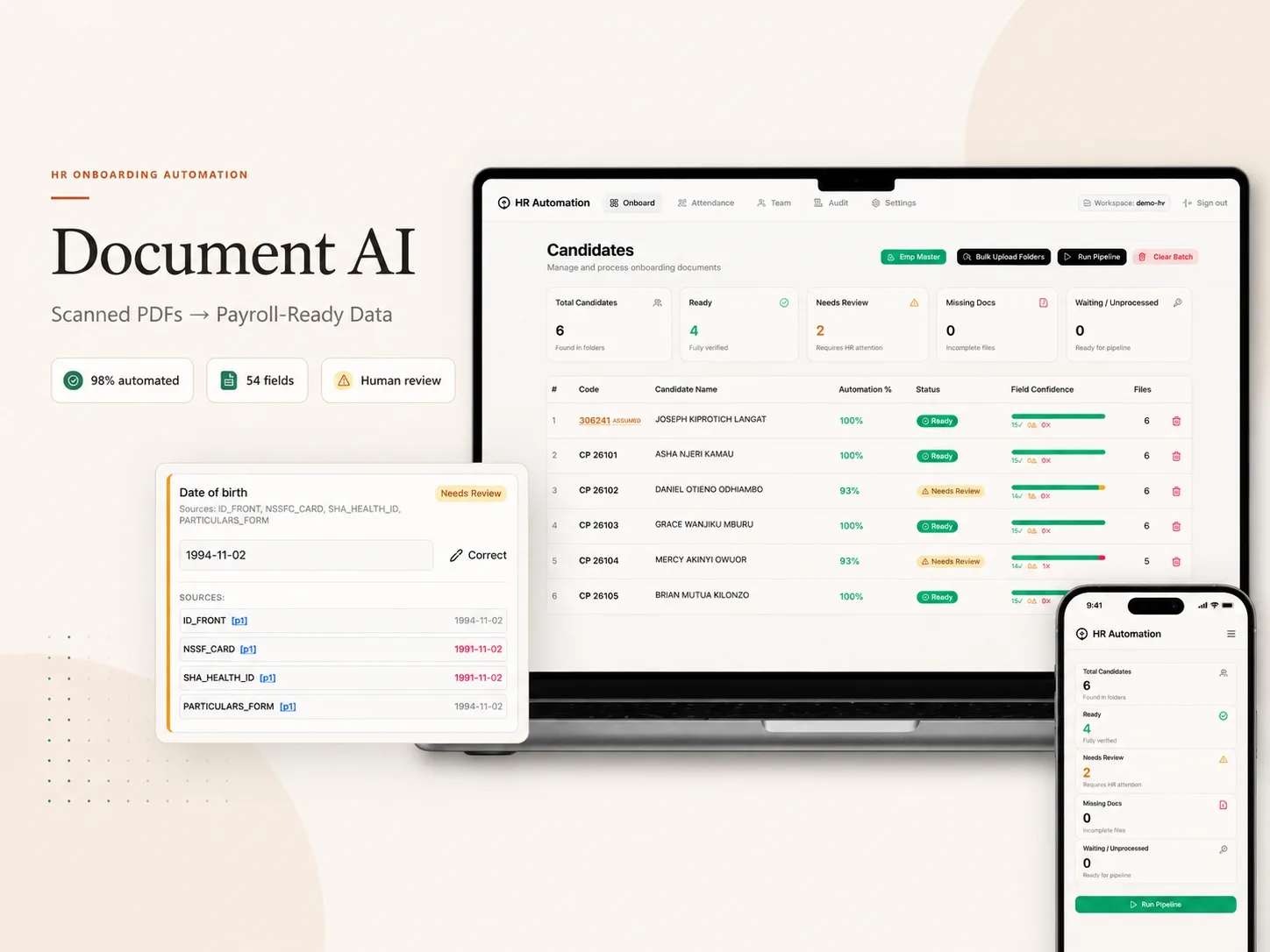
The pipeline decides only when the evidence is clear. Where enough independent documents agree and the value passes that field's format rule, it is written. A lone mismatch against a firm majority is overruled, but the disagreement is recorded on the field. Where there is no majority, it refuses to choose: it shows its best guess and every reading behind it, and waits for a person.
Every value also names the document and page it came from, and one click opens that scan, so checking a field takes seconds rather than a hunt through a folder.
Can document AI be trusted with payroll data?
Only if it is honest about uncertainty and careful about what it stores. When some intakes named folders by payroll number instead of the expected employee code, the system kept the value exactly as written and flagged it amber rather than inventing a prefix, and that flag follows the value everywhere it appears.
The audit log records that a named person confirmed a named field, never the value itself, because an audit trail full of ID numbers is a liability, not a control. It sits outside every workspace, and each team member's workspace is isolated in the storage layer.
What did it change, and what does it cost to run?
In the run shown in the case study, 98% of fields were filled with no human touch, and the output is the client's own payroll template, 54 columns per person. On HR's own estimate, that removes about twelve hours of staff time per forty-candidate intake.
Nothing runs between batches, so it costs nothing while idle. A batch used 3.9 processor-hours against the 730 hours an always-on server would bill, and the architecture avoids about $2,700 a year in infrastructure, measured from the platform's own usage logs.