Warehouse dashboards often fail quietly. They go up on a TV, show too much, need someone to click through them, and the floor stops looking. We built a live floor screen for a fulfilment operation, and the design came from one rule: the screen answers a single question, readable from across the room, without anyone touching it.
What should a warehouse TV dashboard show?
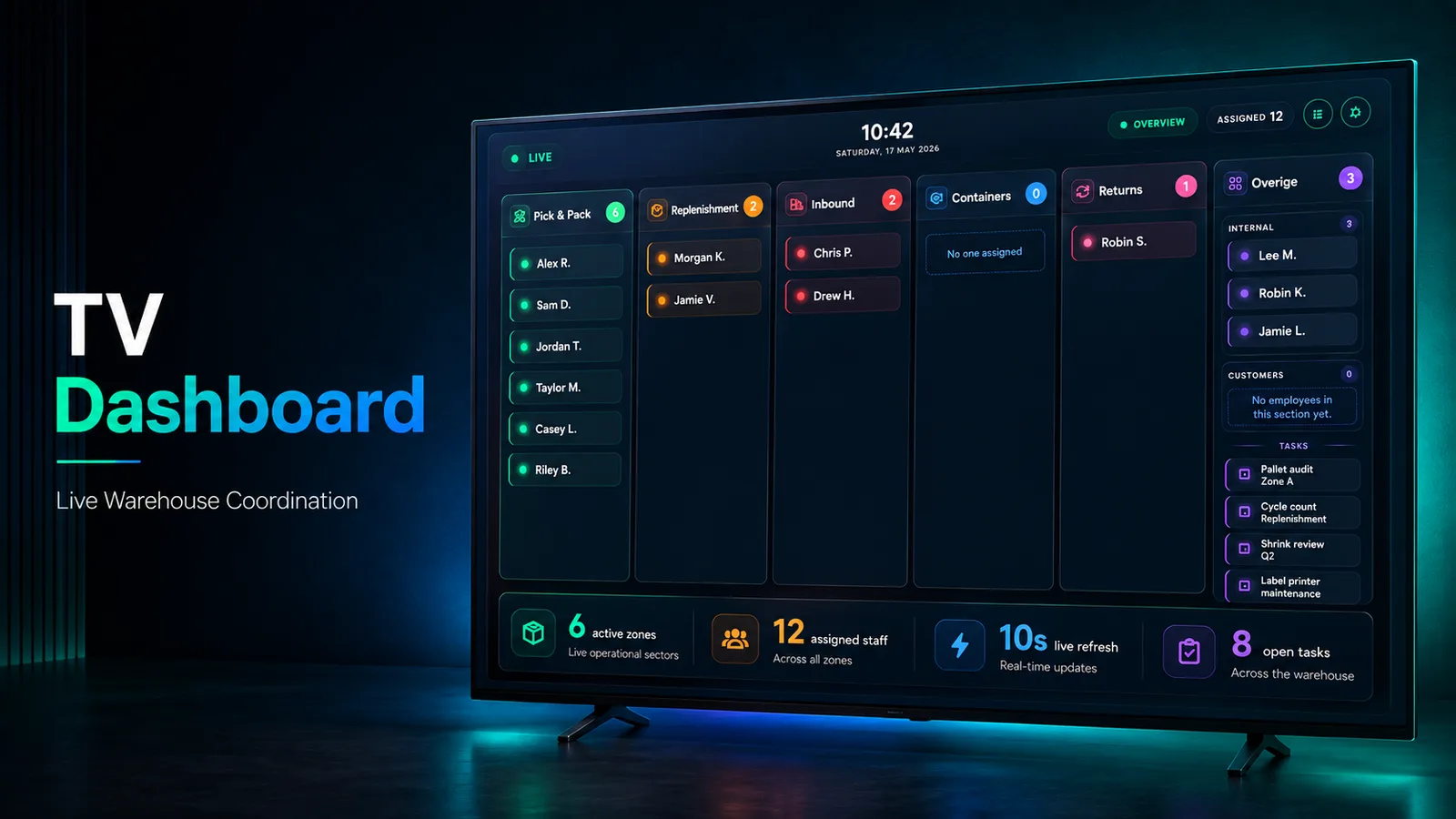
Who is working where, right now. Our dashboard is organised as sector columns (Pick & Pack, Replenishment, Inbound, Containers, Returns and Other), each showing the people assigned there and the tasks pending there, with high-priority tasks highlighted and their owner named.
Putting staff and tasks in the same view is the point. If a team lead has to compare two screens to notice that Returns has work waiting and nobody on it, the dashboard has not done its job.
How do you make a dashboard readable from across the warehouse?
Design it for the wall, not the desk. Presentation mode is a dedicated full-screen view with large type and clear colour coding, built for contrast on a display running around the clock. It refreshes itself every ten seconds, so nobody has to touch it.
That last part is a constraint, not a feature. A screen on the floor has no mouse, and anything that needs one will eventually show stale data.
Where do managers change what the screen shows?
Somewhere else entirely. Everything that changes the answer lives in a separate admin area: assignment, employees, completed tasks and export. The assignment screen shows total employees, active assignments, departments and unassigned staff, and a lead can rebalance people with one click while watching the live totals.
Keeping control off the public screen is what makes the screen trustworthy. Changes are made deliberately, by someone accountable, and the floor only ever sees the result.
How do you get reports out of a live floor screen?
Keep the history the live view throws away. Every finished task keeps its timestamps, owner and logged time, so you can see by department when work started, when it finished and how long it took. Records can be reopened or removed, but only deliberately.
From that history the admin panel produces nine kinds of export, from current assignments and the task activity log to a daily staffing summary, as CSV or XLSX for any date range. The main one is a multi-sheet Excel workbook that rolls up summary metrics, the daily trend and a department snapshot, so a leadership report never needs a database query.
What does it take to build one?
Less than most teams expect. Ours is a Next.js and TypeScript application on Firestore, with ExcelJS for the workbooks: a public screen and a separate admin area. The hard part is not the stack. It is agreeing on the one question the screen answers, and moving everything else off it.